
Computer use
Give an agent its own real computer — a live browser, terminal, and file system it actually operates, with every session recorded.
Most AI stops at generating text. A Busy Bee agent gets its own real computer and uses it — a live browser, a terminal, and a file system — the same way a person at a keyboard would.
Availability: Computer use is included on every plan — every agent gets its own computer, with nothing to switch on. See Plans & credits.
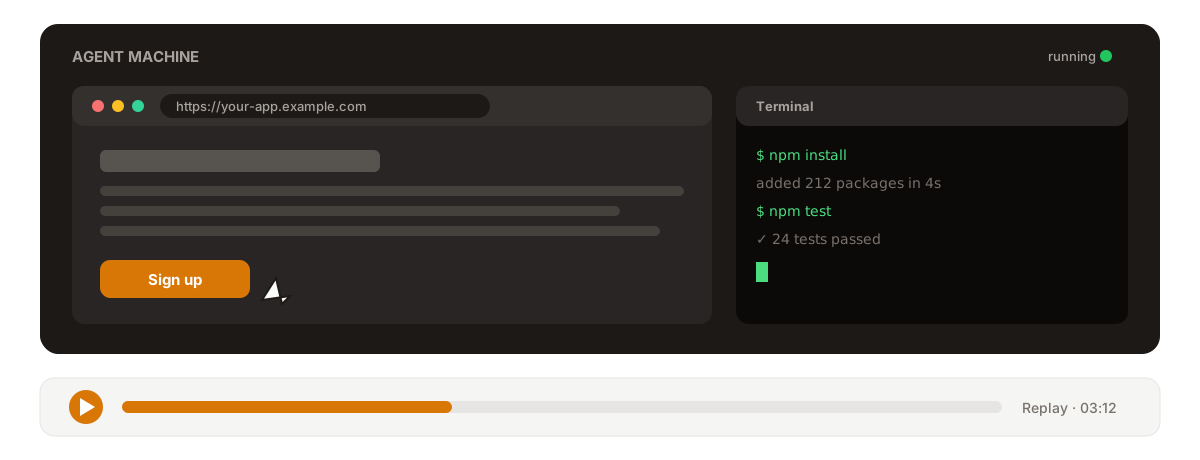
Its own isolated machine
Every project runs on its own machine, separate from every other project. No shared state, no cross-contamination. On that machine an agent can:
- Use the web — navigate sites, log in, fill forms, and click through real web apps in a live Chromium browser.
- Run commands — open a terminal to install packages, run scripts, and execute test suites.
- Work with files — create, read, and edit files on a persistent file system.
How it operates the screen
The agent works the desktop through a tight loop of real actions: take a screenshot to see what's on screen, then click, type text, press a key (with modifiers like Ctrl or Shift), or move the mouse to hover. It looks before each move, checks the result, and adjusts — instead of just describing steps it can't take.
Watch exactly what it did
Every computer-use session is recorded end to end. Open the Replay tab on any task to scrub through a video of the whole session, with a timeline of screenshots the agent captured along the way. Nothing happens off-screen — you can review each click and keystroke after the fact.
Recording finalizes even when a task fails partway, so you can usually review what happened right up to the point it stopped.
Availability
Every agent works on its own computer — a real desktop with a browser and a terminal. There's nothing to enable: tap the agent at the top of a chat and its panel shows its screen, live, while it works.
Where it fits
Computer use powers the hands-on work behind many playbooks and features:
- Web research — driving real sites and pulling data from them.
- Code and GitHub — building, testing, and committing code.
- Data and analysis — gathering and crunching data on the machine.